Firmware Update Checklist: Secure Your Devices Without Downtime
Firmware updates often hide supply chain risks and configuration resets that standard vulnerability scanners completely miss during routine audits.
Use this checklist to verify source integrity, preserve critical configurations, and validate rollback procedures before deploying firmware changes. This process prevents lockouts, data loss, and exposure to known exploits during the update window.
Verify Source and Integrity
You must confirm that the firmware image is authentic before it touches your infrastructure. Attackers often target the distribution channel rather than the device itself, inserting malicious code into legitimate-looking updates. This is a classic supply chain attack vector.
- Check cryptographic signatures: Ensure the update file matches the publisher’s public key to verify it has not been tampered with.
- Validate hash checksums: Compare the SHA-256 hash of the downloaded file against the official value to detect corruption or substitution.
- Inspect the download source: Retrieve files only from verified HTTPS endpoints or secure internal repositories, never from unofficial mirrors.
Imagine an attacker intercepts an update packet and swaps it with a version containing a backdoor. If you skip signature verification, your devices accept this malicious code as trusted. This is why understanding exploit chains is critical; a compromised update is just one link in a longer attack path.
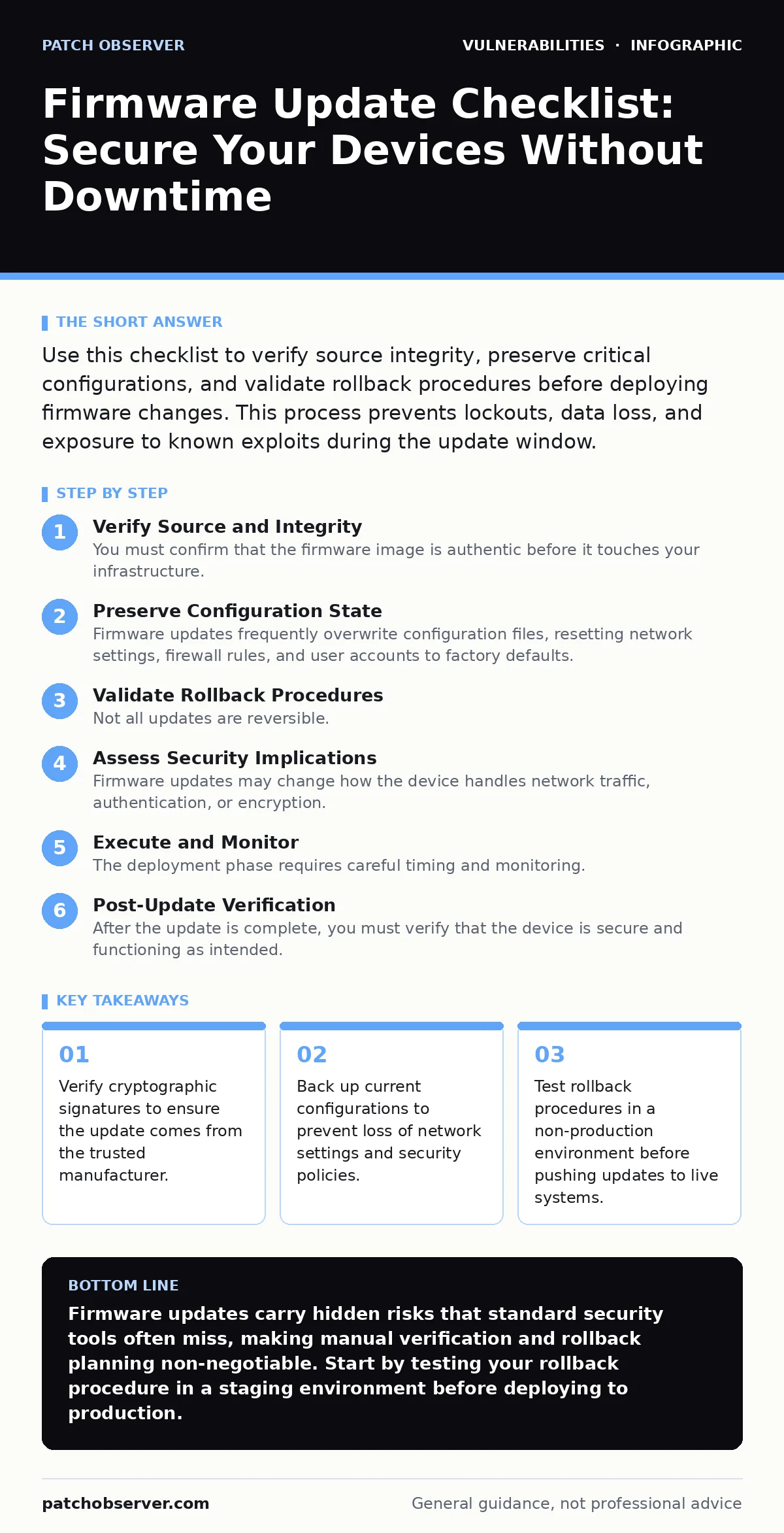
Preserve Configuration State
Firmware updates frequently overwrite configuration files, resetting network settings, firewall rules, and user accounts to factory defaults. This behavior is not a bug but often a design choice to ensure a clean state. It creates a window of vulnerability where devices are exposed with default settings.
- Export current configurations: Save all active settings, including VLANs, ACLs, and routing tables, to a secure external location.
- Document custom scripts: Record any custom boot scripts or automation tools that may be wiped during the reflash process.
- Plan for re-provisioning: Prepare a script or template to quickly restore complex settings without manual re-entry.
This step is vital for maintaining operational continuity. If you rely on vulnerability prioritization frameworks, you know that a device with default credentials is an immediate high-risk target. Restoring configurations is not just about convenience; it is about maintaining your security posture.
Validate Rollback Procedures
Not all updates are reversible. Some firmware changes modify the partition layout or encrypt data in a way that prevents returning to the previous version. You must know the limits of your rollback capability before you commit to the update.
- Test rollback in staging: Perform the update and subsequent rollback in a test environment to verify the process works as expected.
- Verify backup integrity: Ensure your backup of the previous firmware image is complete and bootable.
- Check vendor documentation: Confirm whether the manufacturer supports downgrading to older versions or if the update is one-way.
Suppose a new firmware version introduces a bug that disables remote management. If you cannot roll back, you may need to physically access every device to restore functionality. This hidden cost of time and labor is often overlooked. Understanding IoT device vulnerabilities helps you anticipate these physical access requirements, especially for embedded systems.
Assess Security Implications
Firmware updates may change how the device handles network traffic, authentication, or encryption. These changes can inadvertently weaken your security controls or expose new attack surfaces. You must review the release notes for security-related changes.
- Review release notes for security fixes: Identify which vulnerabilities are patched and whether new ports or services are enabled.
- Check for deprecated protocols: Ensure the update does not re-enable insecure protocols like Telnet or HTTP.
- Validate certificate updates: Confirm that new certificates are installed correctly to prevent SSL/TLS handshake failures.
Some updates introduce features that conflict with existing security policies. For example, an update might enable a web interface that exposes the device to web cache poisoning if not properly configured. You must verify that the new firmware aligns with your organization’s security baseline.
Execute and Monitor
The deployment phase requires careful timing and monitoring. You want to minimize the window of exposure while ensuring that issues are detected immediately. Batch updates rather than rolling them out to all devices at once.
- Schedule during maintenance windows: Deploy updates when system changes will have minimal impact on users and services.
- Monitor system logs: Watch for error messages, crashes, or unexpected behavior immediately after the update.
- Verify connectivity: Test network connectivity and application functionality to ensure the device is operating correctly.
If you encounter issues, stop the rollout immediately. Investigate the root cause before proceeding. This disciplined approach prevents widespread disruption. It also helps you build a more resilient infrastructure.
See also: Wi-Fi Security Checklist: Hardening Wireless Infrastructure · Firmware Update Management: A Step-by-Step Security Implementation
Post-Update Verification
After the update is complete, you must verify that the device is secure and functioning as intended. Do not assume that the update was successful just because the device rebooted. You need to validate the state of the system.
- Confirm firmware version: Verify that the device is running the expected firmware version.
- Re-apply configurations: Ensure that all saved settings and scripts are restored and functioning correctly.
- Run security scans: Perform a quick scan to ensure no new vulnerabilities have been introduced.
This final step closes the loop. It ensures that the update process has not left any loose ends. If you follow responsible disclosure practices, you may need to report any new issues found during this phase to the vendor. This helps improve the security of the entire ecosystem.
By following this checklist, you reduce the risk of downtime and security incidents. You also build a more predictable and secure environment. This is the foundation of effective firmware management.
Key takeaways
- Verify cryptographic signatures to ensure the update comes from the trusted manufacturer.
- Back up current configurations to prevent loss of network settings and security policies.
- Test rollback procedures in a non-production environment before pushing updates to live systems.
Firmware updates carry hidden risks that standard security tools often miss, making manual verification and rollback planning non-negotiable. Start by testing your rollback procedure in a staging environment before deploying to production.
Frequently asked questions
How often should I update firmware?
Update firmware as soon as critical security patches are released, but schedule non-critical updates during planned maintenance windows to minimize disruption.
Can I automate firmware updates?
You can automate the deployment of firmware updates, but you must still verify integrity, backup configurations, and monitor for issues manually or through automated checks.
What if the firmware update fails?
If the update fails, attempt to roll back to the previous version using your verified backup. If rollback is not possible, you may need to re-flash the device manually.
Do firmware updates affect performance?
Firmware updates can improve performance by optimizing code, but they may also introduce bugs that degrade performance. Always test in a staging environment first.
How this guide was produced: written by the Patch Observer editorial team with AI assistance, checked against the public references listed below, and reviewed when the facts change. See our editorial policy or report an error.