Firmware Update Management: A Step-by-Step Security Implementation
Firmware updates often bypass operating system security controls, creating a persistent backdoor if the update chain lacks cryptographic verification and rollback capabilities.

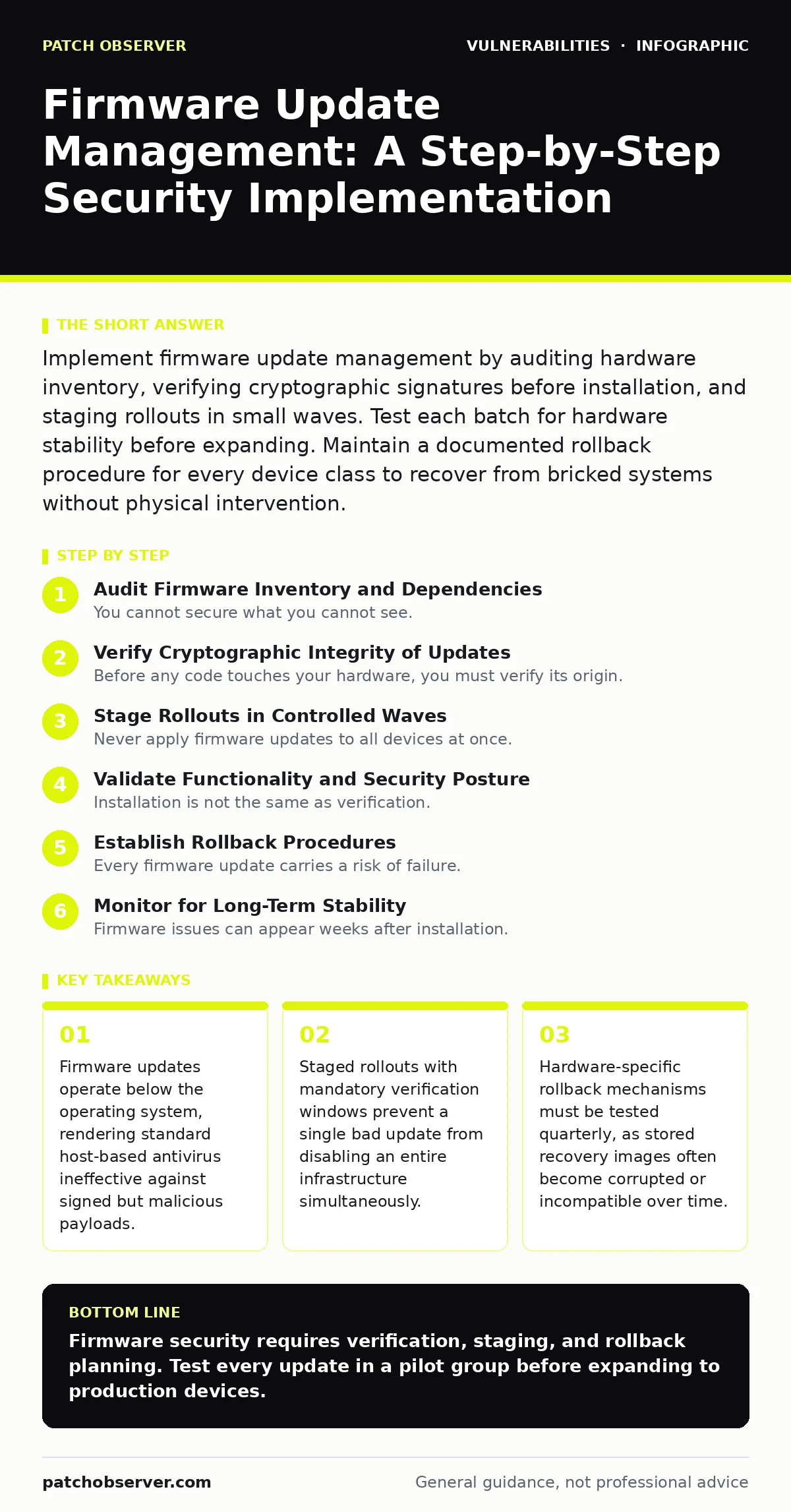
Implement firmware update management by auditing hardware inventory, verifying cryptographic signatures before installation, and staging rollouts in small waves. Test each batch for hardware stability before expanding. Maintain a documented rollback procedure for every device class to recover from bricked systems without physical intervention.
Audit Firmware Inventory and Dependencies
You cannot secure what you cannot see. Many organizations manage operating system patches rigorously but ignore the firmware layer that initializes hardware before the OS loads. This blind spot creates a persistent attack surface. Begin by cataloging every device that contains flash memory or embedded controllers. This includes network switches, routers, servers, IoT sensors, and even peripheral devices like USB hubs.
Identify the specific firmware version running on each device. Record the vendor, model number, and current revision. Map the dependencies between firmware components. A network interface card may require a specific BIOS version to function correctly. If you update one component without checking the other, you risk system instability. This dependency mapping is the foundation of a safe update strategy.
Verify Cryptographic Integrity of Updates
Before any code touches your hardware, you must verify its origin. Firmware updates are often delivered through vendor portals that may be compromised. An attacker who gains access to a vendor’s update server can push a malicious payload to thousands of devices simultaneously. This is why you must verify cryptographic signatures.
Download the firmware package and check its digital signature against the vendor’s public key. Ensure the signature matches the expected hash value. Do not trust the web portal’s interface to tell you the file is safe. Perform this verification on an isolated system. If the signature fails, do not proceed. The risk of installing unsigned or mismatched code is a complete loss of hardware control.
This step protects against supply chain attacks. Even if the vendor is reputable, their systems can be breached. Your verification process is the final line of defense. It ensures that only code explicitly approved by the vendor’s private key reaches your devices.
Stage Rollouts in Controlled Waves
Never apply firmware updates to all devices at once. A single bug in a firmware release can brick an entire fleet of hardware. If every device reboots simultaneously, you lose connectivity and management access. You also lose the ability to diagnose the failure quickly. Instead, stage your rollouts in controlled waves.
Step 1: Pilot Group Testing
Select a small group of non-critical devices for the pilot. These devices should represent the most common hardware models in your environment. Apply the firmware update to this group first. Monitor them for 24 to 48 hours. Check for boot failures, network connectivity issues, and performance degradation.
How to tell it worked: The pilot devices remain operational and report normal metrics. No unexpected reboots occur. Network logs show no authentication errors.
Step 2: Expanded Deployment
If the pilot succeeds, expand to a larger group of devices. This group should include critical infrastructure but still represent only a fraction of the total fleet. Continue monitoring closely. Watch for subtle issues that may not appear in the pilot phase.
How to tell it worked: The expanded group shows no increase in error rates. Support tickets related to hardware issues do not spike. Performance benchmarks remain within acceptable ranges.
Step 3: Full Deployment
Once the expanded group stabilizes, deploy the update to the remaining devices. Schedule this during maintenance windows to minimize disruption. Ensure you have physical access to critical devices in case remote management fails.
How to tell it worked: All devices report the new firmware version. System logs confirm successful installation. No rollback events are triggered.
Validate Functionality and Security Posture
Installation is not the same as verification. You must confirm that the firmware update achieved its intended security improvements without breaking functionality. Check that the previous vulnerabilities are no longer present. Use vulnerability scanners that support firmware analysis. Look for known exploits that the update was supposed to patch.
Verify that hardware features still work as expected. Network interfaces should pass traffic at expected speeds. Storage controllers should not report I/O errors. Audio and video peripherals should function without glitches. If a feature breaks, you may need to adjust configuration settings or revert the update.
This validation step also checks for configuration drift. Firmware updates can sometimes reset settings to defaults. Ensure that security policies, such as disabled debug ports or restricted management interfaces, are still enforced.
Establish Rollback Procedures
Every firmware update carries a risk of failure. You must have a way to revert to the previous version. This is not optional. Some vendors provide rollback tools, but these are not always reliable. Test your rollback procedure regularly.
Document the steps required to roll back each device type. Include the location of the previous firmware image. Ensure that the rollback process does not require physical access if possible. Remote rollback capabilities are preferred for distributed environments.
If a rollback fails, you need a recovery plan. This may involve replacing hardware or using specialized recovery tools. Know these options before you need them.
Monitor for Long-Term Stability
Firmware issues can appear weeks after installation. Monitor devices for long-term stability. Watch for memory leaks, overheating, or gradual performance degradation. Set up alerts for unusual behavior.
Compare metrics before and after the update. If performance drops, investigate the cause. Document any issues found. This data helps you make better decisions for future updates.
Maintain Update Documentation
Keep detailed records of every firmware update. Include the date, version, verification results, and any issues encountered. This documentation helps you troubleshoot problems and comply with audit requirements.
Share this documentation with your team. Ensure that everyone knows the current firmware state of each device. This transparency reduces the risk of accidental misconfigurations.
Integrate with Broader Security Practices
Firmware management does not exist in isolation. It connects to other security practices. For example, improper firmware updates can expose systems to integer overflow vulnerabilities if the update code lacks proper input validation. These bugs can allow attackers to execute arbitrary code at the hardware level.
Consider how firmware changes affect your network security. A firmware update might open a new port or change default credentials. Check for Kubernetes misconfigurations if your infrastructure uses container orchestration, as firmware changes can impact node behavior.
Review your responsible disclosure policy. If you find a vulnerability in a firmware update, report it to the vendor through proper channels. Do not exploit it. This helps keep the entire ecosystem safe.
Be aware of HTTP request smuggling risks if your firmware includes web management interfaces. These interfaces often have unique parsing rules that can be exploited. Similarly, check for OAuth misconfigurations if the firmware relies on cloud services for management.
Finally, consider GraphQL vulnerabilities if your management API uses this protocol. Firmware updates might introduce new API endpoints that need testing. And always watch for Windows privilege escalation vulnerabilities that could be triggered by firmware drivers interacting with the OS.
Key takeaways
- Firmware updates operate below the operating system, rendering standard host-based antivirus ineffective against signed but malicious payloads.
- Staged rollouts with mandatory verification windows prevent a single bad update from disabling an entire infrastructure simultaneously.
- Hardware-specific rollback mechanisms must be tested quarterly, as stored recovery images often become corrupted or incompatible over time.
Firmware security requires verification, staging, and rollback planning. Test every update in a pilot group before expanding to production devices.
Frequently asked questions
How do I know if a firmware update is safe?
Verify the cryptographic signature against the vendor’s public key and check for independent security advisories before installation.
Can firmware updates be applied remotely?
Yes, but only if the management interface is secured and you have a tested rollback procedure in case the update fails.
What happens if a firmware update bricks a device?
You must use the documented rollback procedure or physical recovery methods to restore the previous firmware version.
How often should I update firmware?
Update when critical security patches are released, but always test in a pilot group first to ensure stability.
How this guide was produced: written by the Patch Observer editorial team with AI assistance, checked against the public references listed below, and reviewed when the facts change. See our editorial policy or report an error.