Difference Between SecOps and DevSecOps: 4 Structural Shifts
SecOps acts as a final gatekeeper, while DevSecOps embeds automated checks into every code commit to catch flaws before deployment.

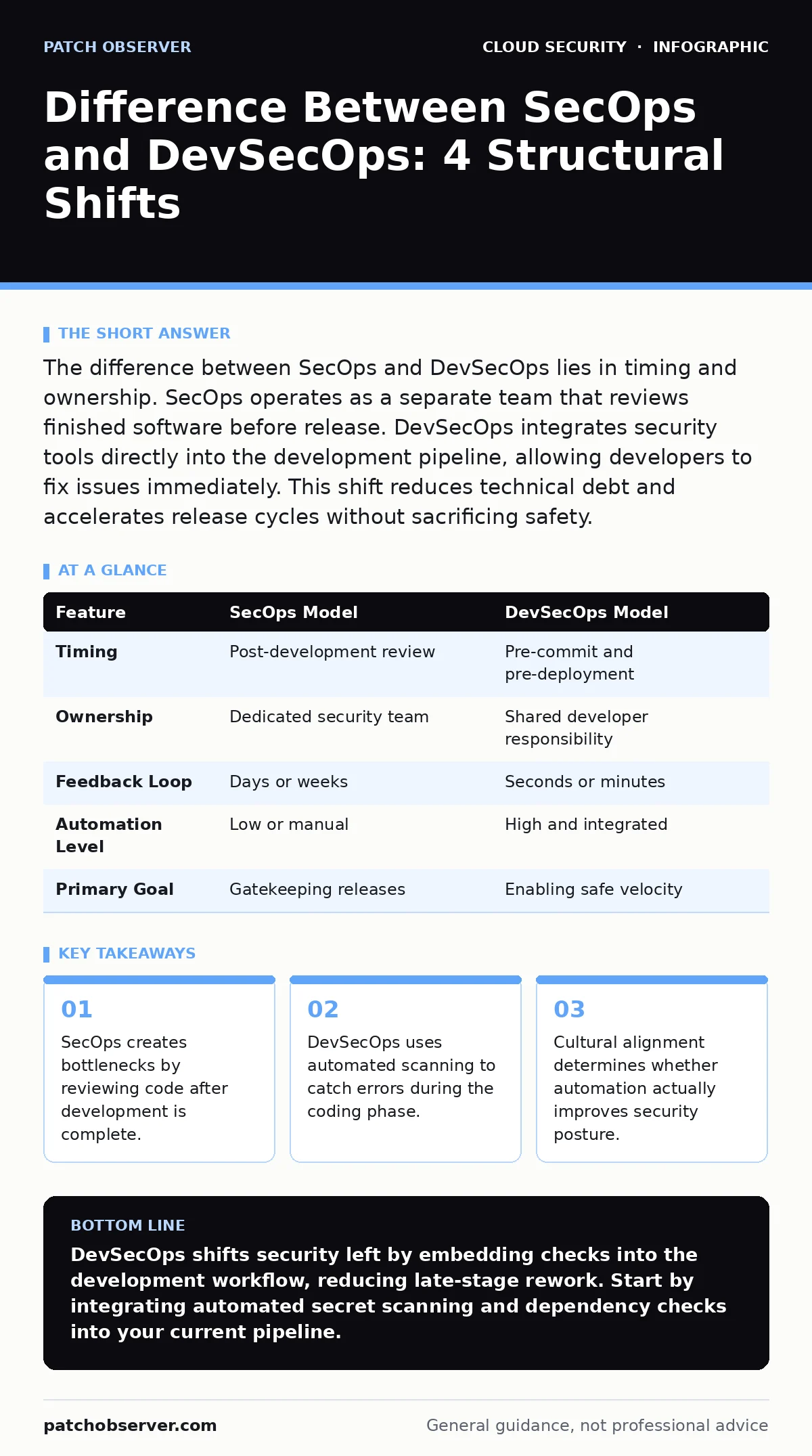
The difference between SecOps and DevSecOps lies in timing and ownership. SecOps operates as a separate team that reviews finished software before release. DevSecOps integrates security tools directly into the development pipeline, allowing developers to fix issues immediately. This shift reduces technical debt and accelerates release cycles without sacrificing safety.
How do you define the difference between secops and devsecops?
The difference between SecOps and DevSecOps is structural rather than philosophical. SecOps treats security as a distinct phase that occurs after development concludes. DevSecOps treats security as a continuous property of the code itself. You can identify the model by observing where the first security check happens. If the check happens before the code reaches production, you are using DevSecOps. If the check happens after the feature is built, you are using SecOps.
Why does traditional SecOps create deployment bottlenecks?
Traditional SecOps relies on manual review processes that scale poorly. Security analysts examine code or configurations only after developers declare a project complete. This creates a queue where developers wait for approval. The longer the queue, the more pressure builds to rush approvals. Rushed approvals increase the risk of overlooked vulnerabilities. This model forces teams to choose between speed and safety. DevSecOps removes this binary choice by automating the initial checks.
Where does security automation fit into the pipeline?
DevSecOps places automated tools directly into the continuous integration and continuous deployment pipeline. These tools run on every code commit. They check for known vulnerabilities, misconfigurations, and license issues. The developer receives immediate feedback. Fixing a bug while writing code takes seconds. Fixing the same bug after months of integration takes days. This immediacy prevents small errors from becoming large architectural problems.
| Feature | SecOps Model | DevSecOps Model |
|---|---|---|
| Timing | Post-development review | Pre-commit and pre-deployment |
| Ownership | Dedicated security team | Shared developer responsibility |
| Feedback Loop | Days or weeks | Seconds or minutes |
| Automation Level | Low or manual | High and integrated |
| Primary Goal | Gatekeeping releases | Enabling safe velocity |
What happens when developers ignore automated findings?
Automation alone does not guarantee security. Tools generate alerts, but humans must interpret them. If the pipeline produces too many false positives, developers learn to ignore the results. This phenomenon is known as alert fatigue. You must tune your tools to report only high-confidence issues. Pair automated scanning with clear remediation instructions. Without context, a security alert is just noise. With context, it is a learning opportunity.
How do you handle secrets in code repositories?
Hardcoded credentials are a primary failure point in both models. Developers often embed API keys or passwords directly into source files for testing convenience. These secrets persist in version history even after deletion. DevSecOps pipelines must include secret scanning tools that block commits containing sensitive data. This prevents credentials from ever reaching the public repository. You should also rotate any secrets that were previously exposed.
See also: CIS Benchmarks for Small Business: Secure Cloud Configs
What infrastructure practices support secure deployments?
Code is only one part of the system. The environment where code runs must also be secure. Infrastructure-as-code scanning checks configuration files for misconfigurations before they are applied. This ensures that servers, databases, and networks are provisioned securely from the start. Manual configuration drift introduces vulnerabilities over time. By defining infrastructure in code, you can version control and audit every change. This approach aligns with cloud guardrails that prevent dangerous state changes.
When should you perform manual security reviews?
Automated tools cannot assess business logic or complex design flaws. You must still perform manual code reviews for critical components. These reviews focus on how data flows through the system. They look for logic errors that scanners miss. Schedule these reviews early in the development cycle. Do not wait until the final stages. Early manual input guides developers toward secure design patterns. This reduces the amount of rework required later.
How does culture impact security tool adoption?
Tools fail when teams view them as obstacles. Developers resent security checks that slow their work. You must frame security as an enabler of quality. Show how automated checks prevent production outages. Involve developers in selecting and configuring tools. Let them see the value in catching bugs early. This cultural shift is harder than installing software. It requires trust and consistent communication. Read more about this dynamic in our guide on MFA for cloud accounts.
What metrics indicate successful DevSecOps adoption?
Track the time between code commit and production deployment. Also track the number of vulnerabilities found in production. A successful DevSecOps program reduces both metrics. If production vulnerabilities decrease while deployment frequency increases, you are winning. Monitor the mean time to remediation as well. Faster fixes indicate a healthier feedback loop. Ignore vanity metrics like total alerts generated. Focus on outcomes, not activity.
How do you manage third-party component risks?
Modern applications rely heavily on open-source libraries. These components introduce supply chain risks. You must scan dependencies for known vulnerabilities continuously. Do not rely on periodic audits. Integrate software composition analysis into your pipeline. This tool inventories every library your application uses. It alerts you when a new vulnerability is published for a component you depend on. This approach protects against threats like cloud ransomware that exploit outdated libraries.
What role do policy-as-code tools play?
Policy-as-code translates security requirements into machine-readable rules. These rules enforce compliance automatically. They check that resources meet specific standards before deployment. This eliminates human error in configuration. You can define policies for encryption, access control, and logging. The pipeline enforces these policies consistently. This approach supports broader initiatives like cloud security assessments by providing continuous evidence of compliance. It also helps mitigate shadow IT by ensuring all deployed resources are tracked and governed.
When does DevSecOps fail to deliver results?
DevSecOps fails when security is siloed within the automation tools. If developers do not understand the security implications of their code, they will bypass checks. You must invest in security training for engineers. Provide secure coding standards and examples. Encourage a blame-free culture where reporting issues is rewarded. Without this foundation, automation becomes a box-ticking exercise. The system appears secure on paper but remains vulnerable in practice. Consider reading about OAuth token abuse to understand how subtle implementation errors can bypass robust architectures.
Key takeaways
- SecOps creates bottlenecks by reviewing code after development is complete.
- DevSecOps uses automated scanning to catch errors during the coding phase.
- Cultural alignment determines whether automation actually improves security posture.
DevSecOps shifts security left by embedding checks into the development workflow, reducing late-stage rework. Start by integrating automated secret scanning and dependency checks into your current pipeline.
Frequently asked questions
Is SecOps obsolete in modern cloud environments?
SecOps is not obsolete, but its role changes. It shifts from manual gatekeeping to policy definition and incident response. Automated tools handle the routine checks, freeing analysts for complex tasks.
Can small teams implement DevSecOps effectively?
Small teams often adopt DevSecOps faster than large organizations. They have less bureaucracy and can integrate tools quickly. Focus on high-impact automations first, such as secret scanning and dependency checks.
How do you measure the ROI of DevSecOps?
Measure ROI by tracking reduced incident response costs and faster release cycles. Calculate the cost of fixing bugs in production versus development. The difference demonstrates the financial value of early detection.
Does DevSecOps replace the need for penetration testing?
DevSecOps does not replace penetration testing. Automated tools find common vulnerabilities, but pentesters find complex, logic-based flaws. Use DevSecOps for continuous monitoring and pentests for periodic deep dives.
How this guide was produced: written by the Patch Observer editorial team with AI assistance, checked against the public references listed below, and reviewed when the facts change. See our editorial policy or report an error.