How Smishing Works: The Step-by-Step Attack Lifecycle
Smishing exploits the psychological gap between receiving a message and verifying its source, turning your phone’s convenience into a vector for remote access and financial theft.
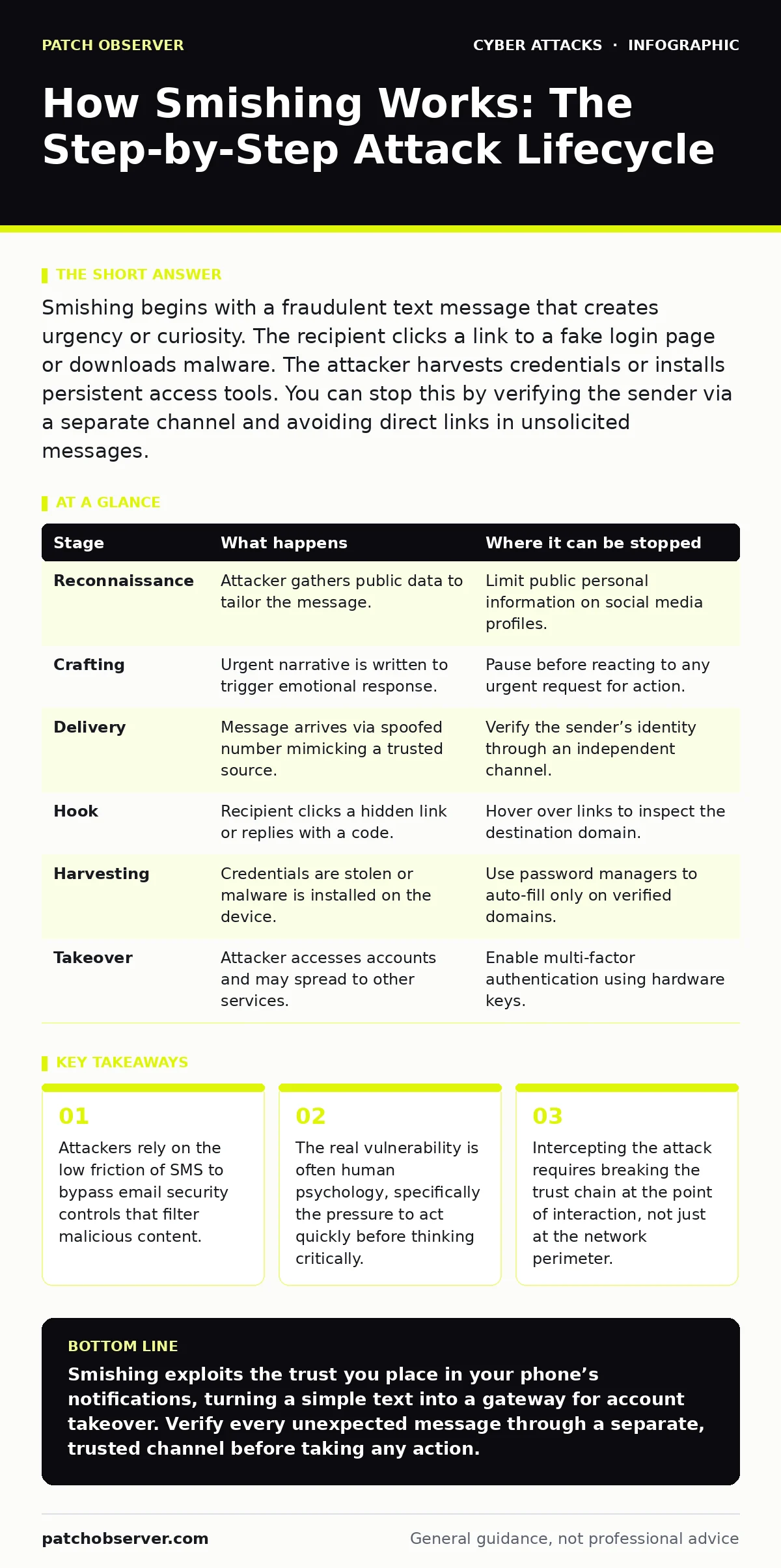
Smishing begins with a fraudulent text message that creates urgency or curiosity. The recipient clicks a link to a fake login page or downloads malware. The attacker harvests credentials or installs persistent access tools. You can stop this by verifying the sender via a separate channel and avoiding direct links in unsolicited messages.
The Anatomy of a Text Message Attack
Text messages feel personal and immediate. Your phone vibrates in your pocket, demanding attention in a way that emails often do not. Attackers exploit this intimacy. They know you are likely to open a text from a number that looks familiar or from a service you use daily. This channel bypasses the heavy scrutiny applied to email inboxes.
Unlike email, short message service lacks robust header analysis for most end-users. You rarely check the technical metadata of a text. This absence of scrutiny allows attackers to send messages that appear legitimate to the naked eye. The medium itself becomes the disguise.
Stage 1: Reconnaissance and Profile Harvesting
The attacker does not start with a message. They start with data. Public profiles on social media reveal your employment, hobbies, and recent life events. Data breaches expose your email addresses and phone numbers. Attackers aggregate this information to build a target profile.
Suppose you recently posted about a new job. An attacker sees this and knows you may be setting up new banking or benefit accounts. They tailor their approach to match this moment of transition. This is not random spam. It is calculated social engineering.
Stage 2: Crafting the Urgent Narrative
The message must compel action. Attackers use scripts that trigger emotional responses. Common themes include account suspension, missed deliveries, or urgent security alerts. The language is often imperfect, with minor spelling errors, but the tone is authoritative.
The goal is to induce a state of heightened arousal. When you are stressed or curious, your critical thinking faculties dim. You want the problem resolved. The attacker provides a simple solution: click this link or call this number. This bypasses your natural skepticism.
Stage 3: Delivery via Spoofed Numbers
The message arrives on your device. The sender ID often looks legitimate. Attackers use caller ID spoofing to mimic official short codes or local area codes. This makes the message appear as if it originated from a trusted entity.
Imagine receiving a text from a number that shares the same prefix as your bank’s official contact line. Your brain registers a pattern match. You assume the source is valid. This visual trickery is the first barrier you must overcome. Checking the number in a separate directory is a slow process that urgency discourages.
Stage 4: The Interactive Hook
The message contains a link. This link is the trap. It may lead to a phishing site that mimics your bank’s login page. It may prompt a download of a malicious application. Sometimes, it asks you to reply with a verification code.
This is where the attack becomes interactive. You are no longer a passive recipient. You are being asked to participate in your own compromise. The link is often shortened, hiding the true destination. You cannot assess the risk by looking at the URL.
See also: Social Engineering Myths: 6 Beliefs That Leave You Vulnerable
Stage 5: Credential Harvesting or Malware Installation
If you click the link, you enter the attacker’s domain. If it is a phishing page, you enter your username and password. The site looks identical to the real one. It uses the same logos and layout. You submit your credentials, believing you are securing your account.
If the link triggers a download, malware installs on your device. This software may keylog your inputs or grant remote access. You might not notice any change. The infection is silent. Your phone now works for the attacker as well as for you.
Stage 6: Account Takeover and Persistence
The attacker uses your stolen credentials to access your accounts. They may reset other passwords linked to your email. They can bypass multi-factor authentication if they intercept the codes sent to your compromised device.
This stage is often silent. You may not notice the intrusion until funds are missing or your account settings change. The attacker has established persistence. They may wait weeks before acting, avoiding detection. This delay makes tracing the initial breach difficult.
| Stage | What happens | Where it can be stopped |
|---|---|---|
| Reconnaissance | Attacker gathers public data to tailor the message. | Limit public personal information on social media profiles. |
| Crafting | Urgent narrative is written to trigger emotional response. | Pause before reacting to any urgent request for action. |
| Delivery | Message arrives via spoofed number mimicking a trusted source. | Verify the sender’s identity through an independent channel. |
| Hook | Recipient clicks a hidden link or replies with a code. | Hover over links to inspect the destination domain. |
| Harvesting | Credentials are stolen or malware is installed on the device. | Use password managers to auto-fill only on verified domains. |
| Takeover | Attacker accesses accounts and may spread to other services. | Enable multi-factor authentication using hardware keys. |
The Hidden Cost of Convenience
Smartphones are always on and always listening. This connectivity is a feature for you, but a vulnerability for security. Unlike a desktop computer, you cannot easily install additional security layers on a mobile operating system without rooting or jailbreaking the device.
This limits your ability to detect threats. You rely on the operating system’s built-in protections. These are good, but they are not perfect. They cannot protect you if you willingly hand over your credentials. The human element remains the weakest link.
Interrupting the Chain
You can stop this attack at multiple points. The most effective point is before you click. Verify the message. If the text claims to be from your bank, do not use the link provided. Instead, open your banking app or navigate to the website manually.
Check the message content. Does it address you by name? Does it reference a specific transaction? If it is vague, it is likely a mass attack. Legitimate organizations usually provide specific details. Vague urgency is a red flag.
Why Standard Defenses Fail
Email security tools often do not scan SMS traffic. This creates a blind spot. Attackers know this. They shift to text messages because the filtering is weaker. This is why you see an increase in these attacks.
Secure email gateways protect your inbox, but they do not protect your SMS inbox. You must treat text messages with the same suspicion as unsolicited emails. Assume any unexpected message is malicious until proven otherwise.
The Role of Verification Protocols
New standards are emerging to help verify message authenticity. These protocols allow your device to check if a message truly comes from the claimed sender. However, adoption is not universal. You cannot rely on this alone.
You must still exercise caution. Even if a message passes a verification check, it could be a spoof that mimics the verification status. Human judgment remains critical. Technology supports your decision, but it does not make it for you.
Comparing Attack Vectors
Smishing differs from other attacks in its delivery method. Business email compromise relies on complex email headers and social engineering over longer periods. Smishing is fast and direct.
Credential stuffing uses stolen passwords to try logging into your accounts. Smishing steals the passwords in the first place. It is the precursor to credential stuffing. Understanding this relationship helps you prioritize your defenses.
The Long Tail of Compromise
Once your credentials are stolen, the damage can persist. Attackers may sell your data on dark web forums. Your information may be used in future attacks against your contacts.
This is why isolation is key. If you suspect a compromise, change your passwords immediately. Use a clean device to do this. Inform your contacts that your account may have been used to send malicious messages. This limits the spread.
The Importance of Monitoring
You cannot always prevent the initial contact. Attackers will find ways to reach you. Monitoring for unusual activity is your last line of defense. Check your account statements regularly. Look for logins from unfamiliar locations.
Security operations centers monitor network traffic for anomalies. You can do a similar check for your personal accounts. Look for password reset emails you did not request. These are signs that an attacker is testing your credentials.
Preparing for the Next Wave
Attackers adapt. They change their scripts, their domains, and their delivery methods. What worked yesterday may not work today. You must stay informed.
Review your security settings periodically. Update your device software. These updates often patch vulnerabilities that attackers exploit. Stay proactive. Do not wait for an incident to improve your defenses.
Key takeaways
- Attackers rely on the low friction of SMS to bypass email security controls that filter malicious content.
- The real vulnerability is often human psychology, specifically the pressure to act quickly before thinking critically.
- Intercepting the attack requires breaking the trust chain at the point of interaction, not just at the network perimeter.
Smishing exploits the trust you place in your phone’s notifications, turning a simple text into a gateway for account takeover. Verify every unexpected message through a separate, trusted channel before taking any action.
Frequently asked questions
Can a smishing text hack my phone just by being received?
No, simply receiving a text message does not infect your device. You must interact with the message by clicking a link, downloading an attachment, or replying with sensitive information for a compromise to occur.
Is it safe to delete a suspicious text message?
Yes, deleting the message is the safest action. Do not reply to it, as this confirms your number is active. Delete it and block the sender to prevent further messages from that specific number.
How do I know if a text is from my bank?
Legitimate banks do not ask for passwords or full credit card numbers via text. If you are unsure, do not use the link in the text. Open your banking app or website directly to check for alerts or messages.
Does two-factor authentication protect me from smishing?
It adds a layer of security, but it is not foolproof. If you enter your password and the one-time code on a fake site, the attacker can use both to log in. Use hardware keys or authenticator apps instead of SMS codes for stronger protection.
How this guide was produced: written by the Patch Observer editorial team with AI assistance, checked against the public references listed below, and reviewed when the facts change. See our editorial policy or report an error.